
Why Managing Time?
It’s not about squeezing every minute to be super productive all the time. It’s about taking control of your day so you’re actually doing what matters to you—whether that’s work, family, hobbies, or just relaxing.
When you manage your time well every day, you just feels like you’re in the driver’s seat of your life
Welcome to another chapter of Beingbetter. Let’s dive into those 10 powerful time management tips.
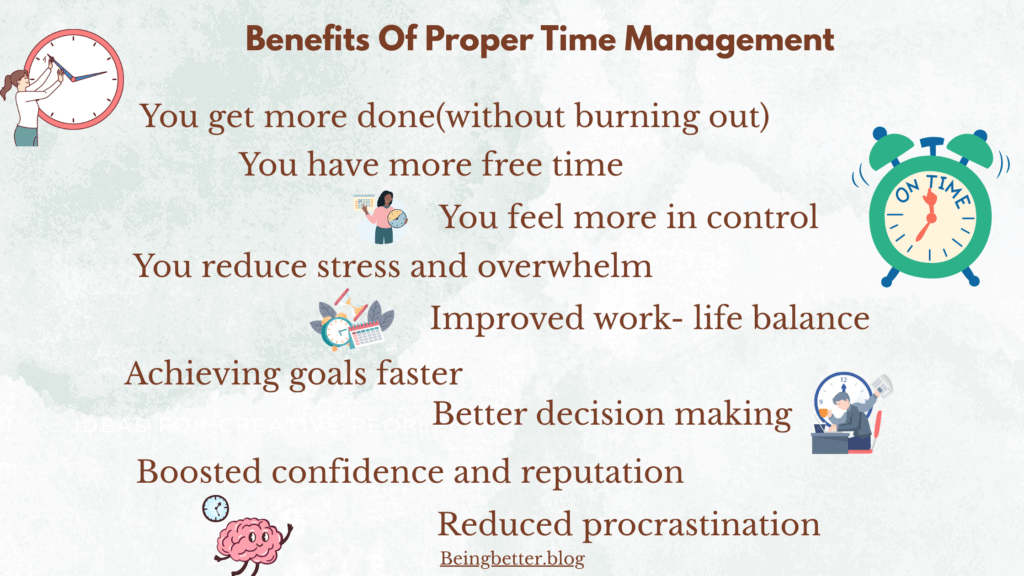
Benefits of Proper Time Management
10 Tips to Manage Your Time Effectively Every Day
1: Make a Proper Daily To-Do List
Creating a daily to-do list sounds basic—but doing it the right way can save you hours, reduce stress, and bring a huge sense of clarity and control.
When to Make Your To-Do List
Evening before (ideal)
- Plan tomorrow tonight—this helps your brain mentally prepare and sleep better knowing you have a plan.
- You’ll wake up focused, not flustered.
Early morning (if needed)
- If your day changes overnight, take 10 minutes after waking up to review and adjust your list.
Time needed: Just 10–15 minutes max.
How to Find Your Priorities
Not everything on your mind is a priority. Here’s how to find what actually matters:
- Use the Eisenhower Matrix:
- Urgent + Important → Do first
- Important but not urgent → Schedule
- Urgent but not important → Delegate
- Neither → Eliminate or delay
- Urgent + Important → Do first
- Ask yourself:
- What tasks will move me closer to my main goals today?
- If I can only do 3 things today, which ones will make me feel accomplished?
- What tasks will move me closer to my main goals today?
- Avoid “fake productivity”:
- Things like organizing folders or reading 50 emails may feel productive, but aren’t always priorities.
- Things like organizing folders or reading 50 emails may feel productive, but aren’t always priorities.
How to Make It Realistic
- Limit tasks: Stick to 3–5 main tasks max.
- Break big tasks into subtasks: “Work on presentation” → becomes “Outline slides,” “Design template,” “Write intro.”
- Estimate time: Be honest about how long things will take. Overestimating is better than cramming.
- Include life stuff: Add personal or home tasks too (e.g., “Call Mom,” “Groceries”).
Tools to Use
Choose what fits your style. Here are a few popular tools:
Paper-based:
- Classic notebook or journal
- Daily planner pad
- Bullet journal method
Digital tools: Different applications like Google Keep or Apple Reminders
If you’re overwhelmed, stick to pen and paper for a while—it’s calming and distraction-free.
🔁 Daily Checklist for a Good To-Do List
✅ Did I write it the night before or early in the morning?
✅ Did I pick just 3–5 truly important tasks?
✅ Are my tasks clear, actionable, and time-estimated?
✅ Do I feel confident I can realistically complete this today?
✅ Did I include breaks or buffer time?
2: Time Blocking
Time blocking means dividing your day into sections (or “blocks”) of time and assigning specific tasks or types of work to each block.
Instead of working from a long to-do list all day, you decide when you’ll do what.
📌 Example:
- 9:00–10:00 AM – Write report
- 10:00–10:30 AM – Emails
- 10:30–10:45 AM – Break
- 10:45–12:00 PM – Client calls
Why Time Blocking Is So Important
- Boosts Focus (You concentrate on one task at a time, reducing multitasking)
- Fights Procrastination
- Reduces Decision Fatigue (You don’t waste time wondering what to do next)
- Improves Work-Life Balance
- Makes Time Visible (You realize how little or how much time things really take)
How to Time block
1: Start With a Master Task List
From your to-do list, pick 3–5 key tasks for the day. These are the things you’ll create blocks for.
2: Choose Your Tool
Use:
- A physical planner
- Google Calendar
3: Assign Time Blocks
Think in hourly or half-hour blocks, and assign each task a time slot.
4: Add Start and End Times
Don’t leave open-ended tasks like “Cooking.” Instead, schedule:
🕒 10:00–11:00 AM – Cut vegetables- tomato, lettuce, etc,. and prepare salad
5: Group Similar Tasks
Batch similar activities together to maintain flow.
Examples:
- 1:00–2:00 PM: Respond to emails + return calls
- 3:00–4:30 PM: Creative work (writing, designing, etc.)
Working non-stop doesn’t make you productive—it leads to burnout.
Breaks help your brain reset, reduce mental fatigue, and spark creativity.
How to Add Breaks:
- 🍵 Use the Pomodoro Technique: Work 25 mins, break 5 mins. After 4 cycles, take a longer break.
- 🌞 After every deep work session (60–90 minutes), take a 10–15 minute break. Walk, stretch, grab water.
🧠 During breaks: avoid screens, change environments, breathe deeply.
Why You Need Buffer Time
Buffer time is:
- Unscheduled space between blocks
- A cushion for unexpected calls, delays, or tasks that take longer than expected
📌 Example:
- 1:00–2:00 PM – Client work
- 2:00–2:15 PM – Buffer
- 2:15–3:00 PM – Emails
This avoids the domino effect where one delayed task ruins the whole day’s schedule.
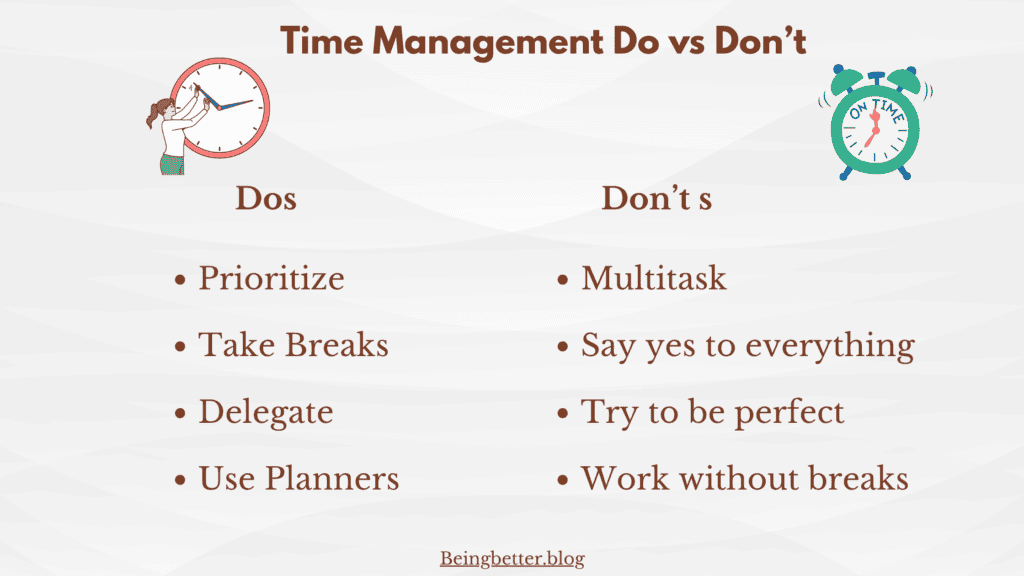
3: The 80/20 Rule – Focus on What Actually Matters
The 80/20 Rule says that 80% of your results come from just 20% of your efforts.
In other words, not all tasks are equal. A small portion of what you do produces most of your success, progress, income, or happiness.
So if you can identify and focus on your “power 20%,” you’ll get more done with less effort and time.
How to Find Your 20% (High-Impact Tasks)
1: Track Your Time for a Few Days
- Use a simple notebook, spreadsheet, etc.
- At the end of each day, ask:
- Which tasks moved me forward the most?
- What felt like “busy work” vs meaningful progress?
- Which tasks moved me forward the most?
2: Review Your Results
- Look at what led to the biggest wins:
- Which actions produced visible outcomes?
- What tasks made you feel accomplished or relieved?
- Which actions produced visible outcomes?
3: Ask Yourself These Powerful Questions
- If I could only do 3 tasks today, which ones would make the biggest impact?
- What do I do that gets results, not just keeps me busy?
- What drains my time but brings little return?
How to Apply the 80/20 Rule in Daily Life
Morning Focus Block = Your 20% Zone
- Schedule your top 1–2 most effective tasks in the first 2–3 hours of the day.
- This time is often distraction-free and high-energy.
Eliminate or Reduce the Time-Wasting 80%
- Cut or delegate tasks that don’t move the needle.
Keep a “Not-to-Do” List
- List tasks or habits that feel busy but aren’t productive.
- Review it weekly to keep yourself on track.
Batch Low-Impact Tasks
- Things like checking social media, emails, admin tasks should be grouped and done quickly at set times (e.g., “Admin Hour” from 3–4 PM).
- This prevents them from stealing time from your 20% tasks.
Review Weekly
- Every Sunday (or weekend), reflect:
- What tasks had the most impact this week?
- What should I do more of? What should I let go of?
- What tasks had the most impact this week?
🔁 Daily 80/20 Checklist
✅ Did I choose my top 1–3 high-impact tasks today?
✅ Am I spending most of my time on things that actually matter?
✅ Did I batch or reduce the low-impact stuff?
✅ Am I reviewing results weekly to stay focused on the 20%?
4: Set Time Limits for Tasks – Work With Intention, Not Indefinitely
Setting a time limit means giving yourself a clear start and end time to complete a task, instead of letting it drag on endlessly.
For example:
- Instead of “Work on project,” say “Work on project from 2:00–3:00 PM.”
- Instead of “Write blog post,” say “Write draft in 45 minutes.”
Why It’s Important
- Prevents Perfectionism: You stop polishing something endlessly because the time’s up.
- Boosts Focus: With a ticking clock, your brain locks in and distractions fade.
- Creates Urgency: A deadline—even a self-imposed one—forces you to take action.
- Makes Tasks Less Overwhelming: A 30-minute block sounds doable. “Finish entire report” doesn’t.
- Avoids Parkinson’s Law: “Work expands to fill the time available.” A 15-minute email task shouldn’t take an hour.
How to Set Time Limits Effectively
1: Estimate Time Honestly
- Look at the task and ask: Realistically, how long should this take?
- If unsure, slightly overestimate—especially when starting out.
2: Use Timers or Alarms
- Use a simple phone timer, Pomodoro app, or tools like Google Timer
3: Work in Sprints (Pomodoro Technique)
- 25 minutes focused work
- 5-minute break
- After 4 rounds, take a longer 15–30 minute break
This keeps your energy fresh and your mind sharp.
4: Write the Time Limit Into Your To-Do List
Instead of:
- “Reply to emails”
Say:
“Reply to emails (25 mins max)”
This trains your brain to work with intention and urgency.
Don’t Forget Buffer Time
Always allow 5–15 minutes between tasks to:
- Take a break
- Reset your mind
- Handle any spillover
This keeps your entire day from falling behind when one task takes longer than expected.
5: Minimize Distractions
Distractions are silent time-thieves. They seem small—just one notification, one quick scroll—but they break your focus, delay progress, and leave you mentally drained.
How to Avoid Distractions While Focusing on a Single Task
1. Silence All Notifications
- Turn off phone notifications (or switch to Do Not Disturb mode)
- Disable desktop pop-ups (email, social media, etc.)
2. Declutter Your Physical & Digital Space
- Tidy your desk before you begin work.
- Close all unnecessary browser tabs and apps.
- Have only the tools or materials you need for the current task visible.
Less visual noise = more mental clarity.
3. Work in Distraction-Free Time Blocks
- Use the Pomodoro Technique or similar focused work sessions:
- 25–50 minutes focus
- 5–10 minute break
- 25–50 minutes focus
- Let family/colleagues know this is “focus time” and you’ll check in after.
🛑 Use a visual signal (like headphones or a door sign) if needed to indicate “do not disturb.”
4. Tame Internal Distractions (Your Own Thoughts)
- Keep a “Distraction Dump” notebook nearby.
- If you suddenly think of a random task, idea, or reminder—jot it down quickly and return to your current work.
- If you suddenly think of a random task, idea, or reminder—jot it down quickly and return to your current work.
- Meditate for 2–5 minutes before a task to calm your racing mind.
5. Schedule Time for Distractions
You don’t have to be perfectly focused 24/7.
- Schedule time for:
- Checking your phone
- Social media
- Responding to messages
- Checking your phone
- When your brain knows it has permission to indulge later, it’s easier to resist now.
7. Say “No” More Often
- Don’t take spontaneous calls or agree to quick “2-minute favors” when in the middle of deep work.
- Protect your focus hours like a meeting with your boss.
6: Tackle the Hardest Task First
It’s about getting your most mentally demanding work done before distractions and fatigue set in.
🎯 Why It Works
- You Have the Most Energy in the Morning
Your willpower and focus are strongest at the beginning of the day. - It Builds Momentum
Conquering the toughest thing first gives you a feeling of accomplishment that fuels the rest of the day. - Reduces Mental Clutter
You’re not spending the day dreading that one thing—you’ve already done it! - Fights Procrastination
You’re not “waiting until you feel like it.” You just do it and move on.
How to Apply This Strategy in Daily Life
Step 1: Identify Your Most Difficult Task
Ask yourself:
- What’s the task I’m most likely to delay?
- Which task has the biggest impact on my goals or success?
- If I could only get one thing done today, what should it be?
Step 2: Do It First Thing in Your Work Block
- Block off the first 1–2 hours of your day for your frog.
- No emails, no social media, no side tasks—just you and that frog.
⏰ Even if it’s not completed fully, starting it first sets the tone.
Step 3: Break the Task Into Smaller Pieces (if it’s huge)
If the task is overwhelming, break it into 2–3 mini-tasks:
- “Outline blog post”
- “Write intro”
- “Draft 1st half”
This removes mental resistance and makes the task feel more doable.
Daily Checklist
☑️ Did I identify my most demanding or difficult task the night before or first thing in the morning?
☑️ Did I block time to do it early?
☑️ Did I resist the urge to delay or replace it?
☑️ Did I make progress (even partial)?
☑️ Did I give myself credit or a reward after?
7: Take Regular Breaks – Recharge to Stay Sharp
Without breaks:
- Your focus declines
- Mistakes increase
- Tasks take longer
- You feel more drained by the end of the day
When you rest smartly, you return with better attention, energy, and creativity.
How to Take Breaks Properly
⏱️ 1. Use Time-Blocking or Focus Cycles
Break your work into focused sessions with short breaks in between.
Popular method:
Pomodoro Technique
- 25 mins work
- 5 mins break
After 4 cycles: take a 15–30 min longer break
You can adjust this to fit your energy:
- 50 mins work / 10 mins break
- 90 mins deep work / 15–20 mins break
💡 Choose a method you’ll stick with.
🧠 2. Do Real Break Activities
Avoid “fake breaks” that still tire your brain (like checking social media, news, or emails).
✅ Ideal break activities:
- Stretching or a quick walk
- Breathing or mindfulness exercises
- Drinking water or making tea
- Listening to calming music
- Staring outside (yes, zoning out helps!)
These give your mind true recovery time.
📵 3. Avoid Getting Lost in Breaks
This is a common trap — a 5-minute break turns into 25!
Here’s how to stay in control:
- ⏲️ Set a timer (use your phone, a Pomodoro app, or a kitchen timer)
- 🧩 Pick specific, quick break activities — not “open Instagram and scroll”
- 🪄 Use a cue: “As soon as the timer rings, I’ll jump back to where I left off”
- 📒 Keep a “next task” note near your workspace so you don’t lose flow
🔁 4. Make Breaks a Non-Negotiable Habit
Add breaks into your daily plan just like meetings or work blocks.
- Don’t wait to feel burnt out before taking one
- Taking a break before you get exhausted = better performance
8: Plan Tomorrow Today – Set Yourself Up for a Calm, Focused Start
Planning your next day the night before helps you:
- Start your day with clarity and purpose
- Avoid the morning rush of decision-making
- Sleep better with fewer racing thoughts
- Focus on what truly matters from the moment you wake up
You wake up knowing exactly what to do, instead of wasting time deciding or reacting.
Best time:
Evening (15–30 minutes before winding down your day)
- Right after work (when tasks are still fresh in your mind)
- Or during your nighttime routine (helps signal the brain it’s time to relax)
Avoid doing it too late, as it may trigger overthinking right before bed.
How to Plan Tomorrow Effectively
✅ 1. Reflect on Today Briefly
Before planning, ask yourself:
- What did I accomplish today?
- What didn’t get done and why?
- What needs to be carried over?
This reflection gives you honest insight to plan smarter tomorrow.
✅ 2. List Out Tomorrow’s Key Tasks
Use a simple to-do list or daily planner.
Organize into:
- 🔥 1–3 Most Important Tasks (MITs)
- 📌 Secondary tasks
- 🧠 Optional/low-priority
Don’t overload the list — make it realistic and focused.
✅ 3. Time Block Your Day (Optional but Powerful)
Once you have your task list:
- Slot the top priorities into your calendar
- Add buffer time + breaks
- Leave space for unexpected events
This step helps visualize your day clearly and reduces decision fatigue.
✅ 4. Set Up Your Workspace or Tools
Take 5 minutes to:
- Clean your desk
- Keep materials ready for your first task
- Prepare your water, charger, notes, etc.
This makes it easy to dive in the next day without friction.
✅ 5. Mentally Shut Down for the Night
Once the next day is planned:
- Stop thinking about unfinished tasks
- Tell yourself: “I’ve got a plan. I can rest now.”
This habit reduces bedtime anxiety and allows deeper rest.
Check out my article on Bedtime Routines that help You Sleep Deeply –10 Bedtime Habits That Help You Sleep Deeply
✅ Evening Planning Checklist
☑️ Did I review today’s accomplishments and leftovers?
☑️ Did I choose 1–3 key tasks for tomorrow?
☑️ Did I schedule or time-block those tasks?
☑️ Did I prepare tools, notes, or workspace?
☑️ Did I let go mentally and allow myself to rest?
9: Learn to Say No
Why Saying No Matters
Your time is limited and valuable. Every time you say yes to something that doesn’t align with your goals or values, you’re saying no to something that does — often your own priorities.
Learning to say no:
- Helps you avoid overwhelm and burnout
- Creates space for meaningful work and rest
- Builds confidence and self-respect
- Teaches others to respect your time too
When Should You Say No?
You should consider saying no when:
- The request doesn’t align with your goals or current focus
- You already have a full schedule
- You’re being asked to take on something that someone else can or should do
- The task is draining your energy without real value
How to Say No Gracefully (Without Guilt)
Saying no doesn’t have to be rude or harsh. Here are a few polite but firm ways to decline:
1. Direct but kind:
“I really appreciate the offer, but I won’t be able to take that on right now.”
2. Offer an alternative:
“I can’t commit to that, but I suggest [name/resource] who may be able to help.”
3. Delay your answer if unsure:
“Let me check my schedule and get back to you.”
(Gives you time to think instead of committing instantly.)
4. Protect your priorities:
“I’m currently focused on [your task/goal], so I have to pass on this.”
What Happens When You Don’t Say No?
- You become the “go-to” person for everyone’s problems
- Your own priorities constantly get delayed
- You feel resentful, drained, and overbooked
- Your mental health and productivity suffer
Learning to say no is not selfish — it’s smart self-management.
10. Review and Improve
This step is about consistently evaluating your progress and refining your approach to time management. Even the best plans can hit snags or miss the mark if they aren’t updated to fit your evolving needs and circumstances. Here’s how to put this step into action:
✅ Reflect Weekly
Set aside time at the end of each week—perhaps on a Friday afternoon or Sunday evening—to reflect on how your time management efforts have been going. This regular check-in helps you spot patterns and stay on track.
✅ Ask the Right Questions
During your review, consider:
- What tasks or strategies worked well?
- What didn’t work as planned?
- Were there any unexpected challenges?
- Did you procrastinate on certain tasks? Why?
- Which tasks drained your energy or motivation?
✅ Identify Adjustments
Once you’ve identified what’s working and what’s not, decide how you can tweak your routine to improve. For example:
- Could you batch similar tasks together to save time?
- Would it help to move your most challenging work to a time when you’re more focused?
- Are there tasks you can delegate or eliminate?
✅ Set Small Goals for Improvement
Don’t try to overhaul everything at once. Pick one or two small tweaks you can make for the upcoming week. Over time, these small adjustments add up to significant improvements.
✅ Keep a Growth Mindset
Remember that productivity is a journey. Some weeks will be more challenging than others. The goal isn’t to be perfect but to steadily improve and adapt as you learn more about how you work best.
Time management isn’t about being perfect or super strict. It’s about making small, practical choices every day to help you work smarter, not harder. Over time, you’ll notice you’re getting more done, feeling less stressed, and actually enjoying your days more. Remember, it’s not about doing everything—it’s about doing what matters most to you, one day at a time!